Latest Updates

Follow new updates and improvements to MonuDesk.

April 16th, 2026

Your task settings got a major upgrade. You now have full control over how your tasks look, what the steps are called, and which ones show up on your orders.


For each task, you can rename the steps, recolor them, reorder them, and edit the description. If you create your own custom task, you have full control β€” add steps, delete steps, rename everything, or delete the whole task if you no longer need it.

You can also turn off tasks your shop doesn't use. If you don't do foundation work, turn it off and it won't show up on new orders. Four tasks can never be turned off β€” Quote, Payment, Design, and Stone β€” because they keep everything else running.


Want something that doesn't exist yet? Hit Add Task and build it from scratch. Your custom tasks show up on all new orders just like the built-in ones.

To get started, go to Settings and open Orders & Workflow.

April 14th, 2026


✨ A completely refreshed experience

Dennis locked the dev team in his basement over the weekend and gave them an unlimited supply of coffee and Pizza Hut. This is what came out.

The two places you spend the most time in MonuDesk, the New Quote popup and the Order Overview, have been redesigned from the ground up.

Everything looks cleaner, feels faster, and responds better. Buttons click the way you expect. The accessories step has been refreshed too. If the app ever felt sluggish or clunky before, that's gone now.


πŸ› οΈ A lot got fixed

We resolved a significant number of reported issues in this update. If something was bothering you, go try it today. There's a good chance it's fixed. The customer portal in particular is noticeably more stable.


The basement was worth it. Go see for yourself at app.monudesk.com.

April 10th, 2026


πŸ‘€ New Contacts page

There's now a dedicated Contacts page in MonuDesk. Add your customers, take notes, and organize them by category. When you start typing a name in New Quote, it searches your contacts and fills in the details for you. When you create an order, a contact is created automatically too.

Good to know: If a contact is a business customer, you can categorize them as such. When you select them in New Quote, the form switches to business-to-business mode β€” tax is set to zero automatically and the customer portal link is turned off so they don't receive it. Order cards reflect the customer type too, and you can filter the Order Management board to show only wholesale or only retail orders.


🏷️ Control tax on individual line items

Before, every line item was taxed. Now you can turn tax on or off for each item individually. If services aren't taxed in your state, just disable it on that line. Full control, no workarounds.


πŸ“„ Custom line items now show on all PDFs

Any custom line item you add to an order now appears on every PDF β€” invoice, receipt, shop ticket, and contract.


Also in this update

Cemetery and foundation fees were missing from PDF line items. Fixed. The size-based cemetery fee calculator was reworked to be easier to use. The customer portal menu is now grayed out when there's no email on the order or it's a service order. Document visibility in the customer portal now defaults correctly β€” financial documents and drawings are external by default, everything else is internal.

The PDF was showing bevel and slant markers as "Die" instead of their correct type. Fixed. The shop ticket now shows proper finish labels like S2, S3, P2, P3 instead of raw codes.

You can now click the top navigation buttons to move between New Quote, your drafts, and your edit order screen without going back to the board. Much faster.

A sketch bug where removing a name still left the image visible is resolved.


Don't just read about it β€” try it at app.monudesk.com.

April 7th, 2026

Two of the biggest features on the roadmap are now live.


πŸ”— Customer Portal

Your customers can now track their own order β€” no more status calls. They get a personal link showing exactly where their order is, with your branding, your contact info, and a live progress timeline. You control what they see and when.

πŸ‘‰ Watch the full 4-Minute walkthrough (Recommended)

Or Read the full guide


πŸ“Š QuickBooks Online

MonuDesk now syncs directly with QuickBooks Online. Every confirmed order and logged payment flows into QBO automatically. Go to Settings, then Integrations, then QuickBooks to connect your account in seconds.


Don't just read about it β€” try it at app.monudesk.com.

April 1st, 2026

πŸ›οΈ Choose the right cemetery fee per order

Different monuments call for different cemetery fees. You can now set up fee options for each cemetery and select the right one when creating an order β€” single marker, double marker, or whatever that cemetery charges. No more applying the wrong fee or manually overriding it.

To set it up: go to Settings, open Cemetery, click on a cemetery, and turn on Cemetery Settings. From there you can add fixed fees or fees by size.


πŸ”„ Real-time updates across your team

When a team member moves an order on the Order Management screen, your screen updates automatically. No more refreshing to see what's changed. Everyone on your team is always looking at the same board.


🏺 New vase styles and porcelain options

Two new vase styles are now available: lawn flush vase and square vase. Porcelain now has two new shapes β€” square/diamond and domed. And alongside black & white and color, there is now a sepia mode for porcelain portraits.


πŸ’³ Payment split is no longer locked on quotes

When saving an order as a quote, you can now leave the payment split at $0 in the billing tab. When the customer comes back ready to commit, edit the order, set the payment split β€” 50/50 or whatever you agreed on β€” and generate a new contract from the document button in the top right of the Order Overview. The contract will reflect the correct payment split.


Also in this update

Preset buttons are now highlighted when selected, so you can see at a glance which preset is active. And a round of major stability fixes across the app.


Don't just read about it β€” try it at app.monudesk.com.

March 27th, 2026

🎨 Custom Monument Colors

You can now add and edit your own granite colors. Go to Settings and create the exact color names your suppliers use. No more picking from a generic list that doesn't match your stone catalog.


πŸ” New:Β Smart SearchΒ 

You can now search and filter by:Β 

  • cemetery,

  • stone color,

  • stone type,

  • service type,

  • order number,

  • decedent name,Β 

  • customer name,

  • customer email oooor

  • phone numberΒ 

Type a cemetery name like "Fairview" and the board filters down to only show your Fairview orders. Search "India Red" and you'll only see orders with that granite color. Need to find all your cleaning jobs? Search "Cleaning" and only those service orders show up. One search bar, every way to find what you need.


πŸ’³ Payment Notes

When you record a payment, there's now a notes field where you can write down the check number, a reference, or any detail you need to remember. Quick and simple.


πŸ“„ Generate Documents on Demand

New document generation buttons let you manually create invoices, receipts, contracts, and shop tickets whenever you need them.

Edited an order and need an updated invoice? Just click Generate Invoice and you'll get a fresh one with the current data.


Log in to see what's new at app.monudesk.com

March 25th, 2026

The two most-requested features are finally here!


✏️ You can now edit orders and quotes

This has been the most requested feature for the last 2 weeks. You can now open any order or quote and edit it directly. Change a price, fix a typo, update a dimension, swap a granite color β€” whatever you need. No more deleting and rebuilding from scratch.


πŸ“‹ Duplicate orders

You can now duplicate an order directly from the Order Overview. If a family wants to compare options, or you want to use an existing order as a starting point for a new one, just duplicate it and adjust from there.


🧾 Tax-exempt orders

You can now mark items as tax exempt. If you're doing a wholesale order, or any other situation where tax doesn't apply, you can handle it properly inside MonuDesk instead of working around it manually.

🎨 Custom litho colors and lettering styles

You're no longer limited to the preset options. You can now enter a custom litho color and a custom lettering style when building an order in New Quote. If your supplier offers something outside the standard list, you can capture it properly now.


πŸ—‚οΈ More information on every order card

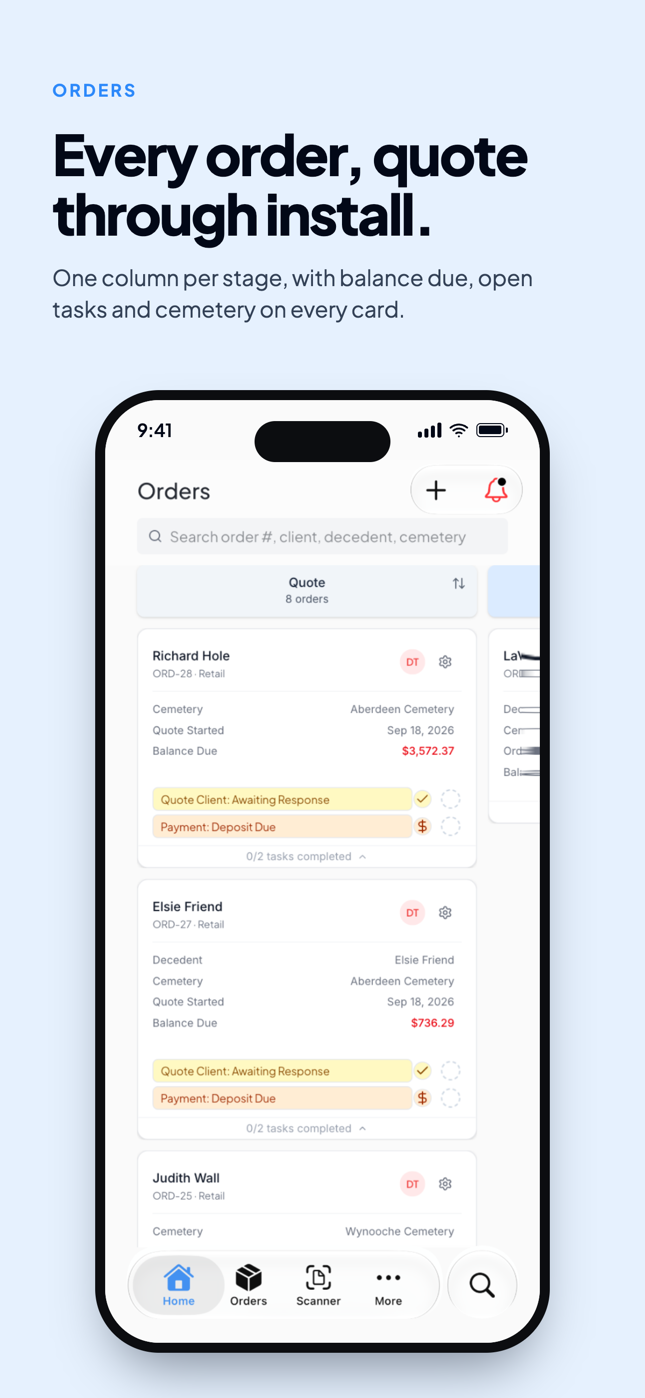
Your order cards on the Order Management screen now show the deceased's name and the cemetery name. More useful information at a glance without having to open the order. You can also click the cemetery name directly on the card to open the cemetery details.


As always, if something's not working or you have an idea, hit the feedback button or message us in the chat. We read everything.

It's all live. Jump in at app.monudesk.com.

March 18th, 2026

βž• Add your own line items in the pricing panel

This one's been a long time coming. You can now add custom line items directly in the pricing panel inside New Quote. Discounts, extra charges, custom services, anything β€” just add a line, give it a name, and set the amount. No more working around the fixed fields when your order doesn't fit the standard structure.


πŸ—‚οΈ Order cards have a new look

Your order cards on the Order Management screen have been redesigned. Each card now shows the cemetery name and order number at a glance, and you can expand or collapse cards in a cleaner way than before.


πŸ“± Order Management is now optimized for iPads

If your team uses iPads on the floor or in the office, the Order Management screen now fits and functions properly on that screen size. More optimization for the Order Overview and New Quote screens on iPads is coming soon.


Also in this update

Cemeteries in Settings now have a search bar. If you work with a long list, you no longer have to scroll through all of them to find the one you need.

Drafts in the New Quote dropdown now show the date they were created, so you can tell at a glance which draft is which. You can also delete them directly from the dropdown.


As always, if something's not working or you have an idea, hit the feedback button or message us in the chat. We read everything.

Try out the new features by logging back in https://app.monudesk.com

March 16th, 2026

πŸ“ Feet and inches now show everywhere they should

When you enter dimensions in feet and inches, those units now carry through to your PDFs β€” shop ticket, invoice, and contract β€” and into the order overview as well. No more sizes showing up as raw numbers without context.


πŸ—‘οΈ You can now delete New Quote drafts

Hover over any draft at the top right of the New Quote popup and a trash icon will appear. Clean out drafts you no longer need without any extra steps.


πŸͺ¦ Bronze marker fields cleaned up

When selecting bronze as the monument type, the form was asking for front and back finishes β€” which don't apply to bronze. Now it only shows top and edges. Litho color and lettering style have also been removed for bronze markers since they don't apply either. Less clutter, fewer confusing fields.


Also in this update

When you logged a payment and moved an order from the Quote stage to Confirmed, the screen required a manual refresh to reflect the change. That's fixed β€” everything updates automatically now.


As always, if something's not working or you have an idea, hit the feedback button or message us in the chat. We read everything.